How text message opt-in works
Screenshots captured from the live flow on 5 October 2026
PropNotice, operated by errorHandle LLC, monitors published New York City agency records for buildings its customers identify and notifies the people those customers designate. A small number of those alerts may be sent by text message, and only to someone who has individually agreed to receive them.
This page exists so that anyone — a recipient, a customer, or a carrier reviewing the messaging programme — can see exactly how that agreement is obtained. The screenshots below are of the live pages on this domain, captured by driving a browser through the real flow. There is no separate form for reviewers.
Privacy Policy · Terms of Service, including the SMS Terms section · help@propnotice.com
The programme in one paragraph
Non-marketing property compliance notifications, operated by errorHandle LLC. Opt-in is double opt-in: an email invitation, then an explicit confirmation on a web form. There is no keyword opt-in, no opt-in at a point of sale and no paper form. Only three kinds of record may be sent by text — a new FDNY-issued summons returnable at OATH, a reminder before a scheduled OATH hearing, and a record issued at the highest severity an agency publishes. Every other alert PropNotice sends is email only. Message frequency varies with what the agencies publish. Message and data rates may apply. Reply STOP to end, HELP for help.
The four steps
1. An administrator requests consent. Nothing is sent.
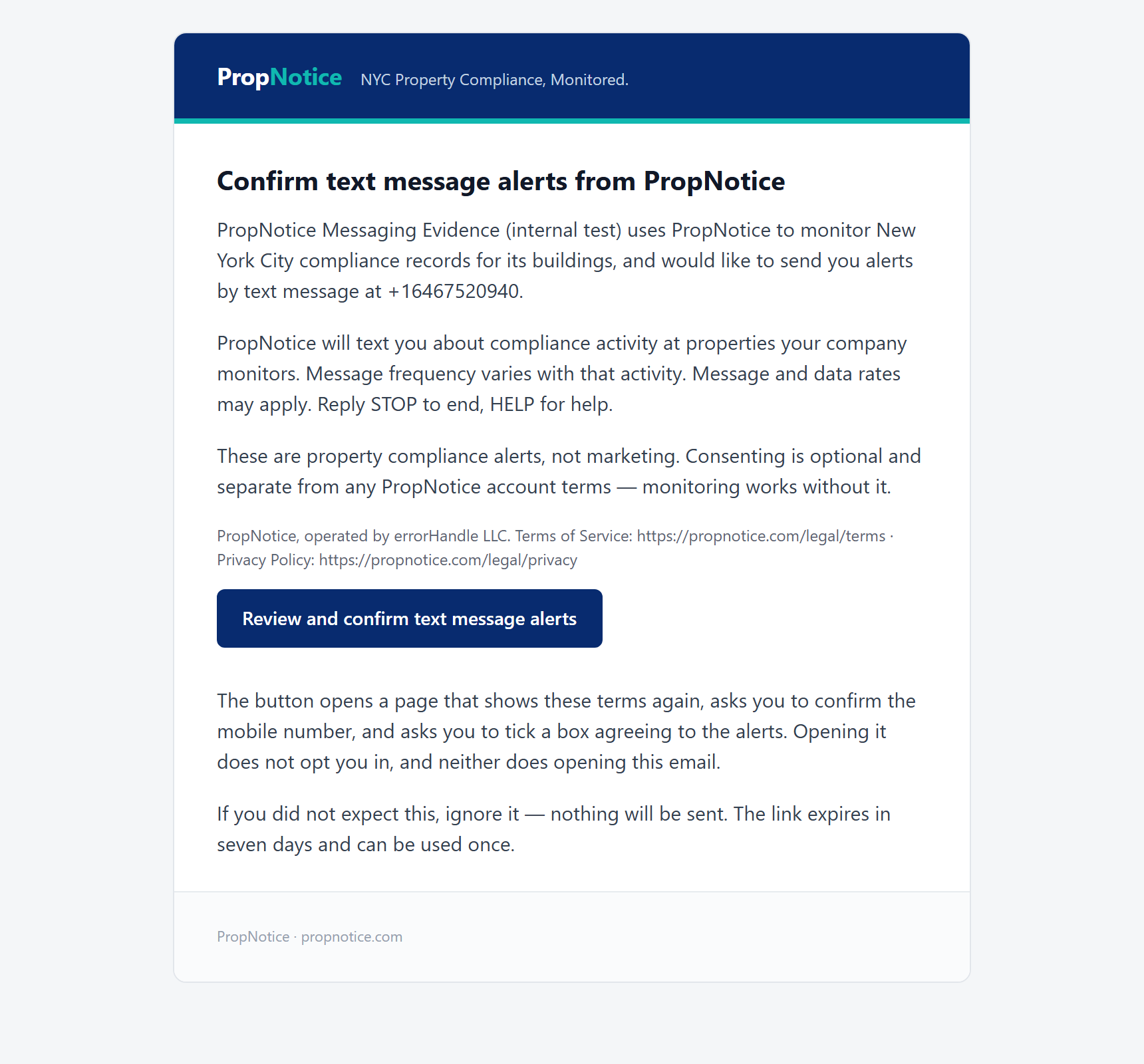
A customer adds a recipient's mobile number and email address and asks us to invite them. That is a request, not a consent: it subscribes nobody and sends no text message. The recipient then receives this email.
It names PropNotice, operated by errorHandle LLC, the organization asking, the destination mobile number and what the alerts are for. It carries the messaging disclosure verbatim, links the Terms of Service and the Privacy Policy, and says in terms that opening the email does not opt anyone in.
2. The invitation opens the consent form. It grants nothing.
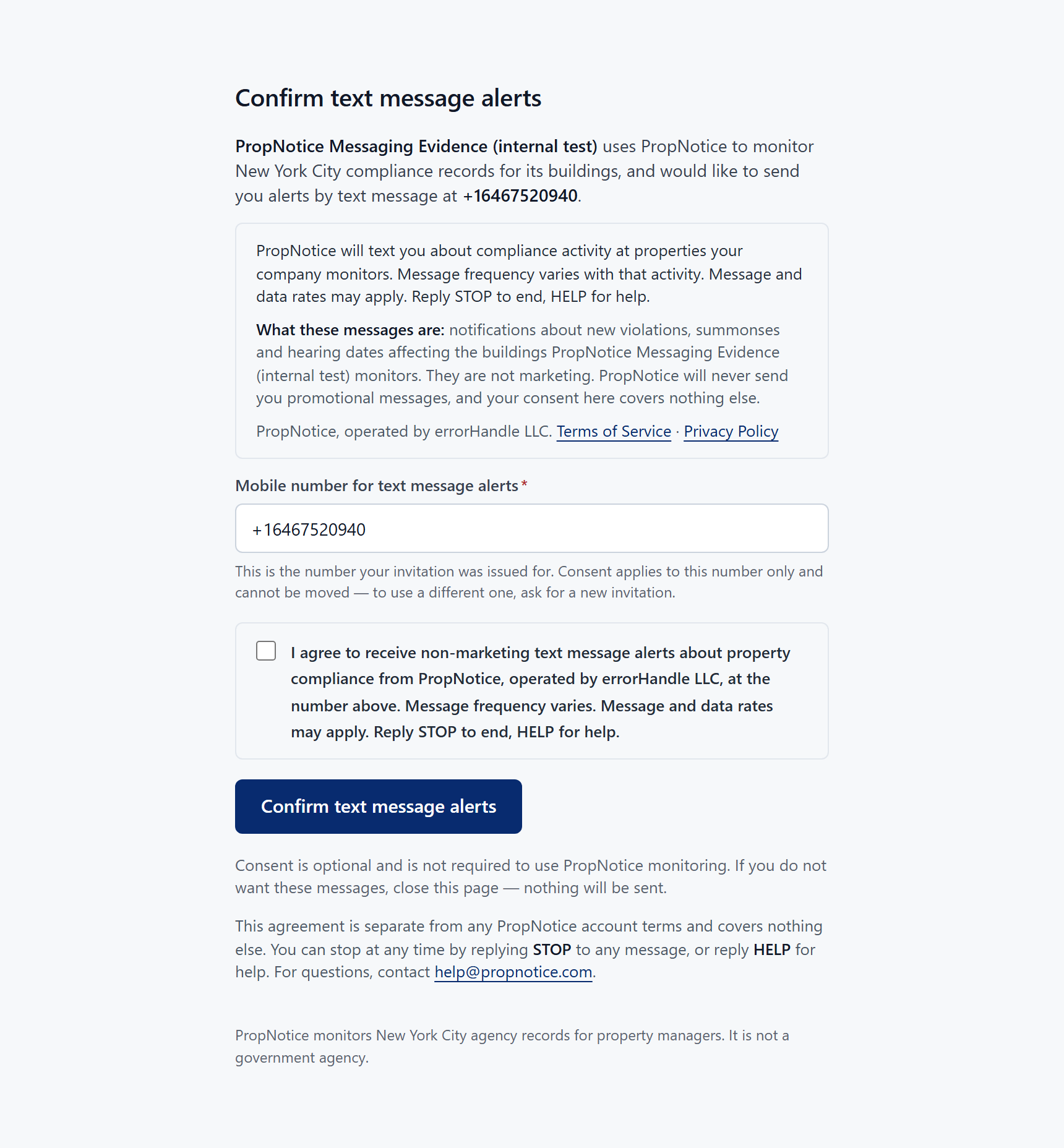
This is the screen a person agrees on, as it arrives. Everything a decision needs is visible before anything is submitted — the disclosure, what the messages are, the operator, both legal documents, the mobile number, and the fact that consent is optional.
Loading this page records nothing. An earlier version of this flow confirmed consent on page load, which meant a mail client, a link scanner, a security gateway or a browser prefetch following the link would create a consent record for somebody who had never decided anything. Consent whose evidence is “a URL was fetched” cannot tell a person from a crawler, so that was removed.
3. The recipient confirms the number and ticks the box.
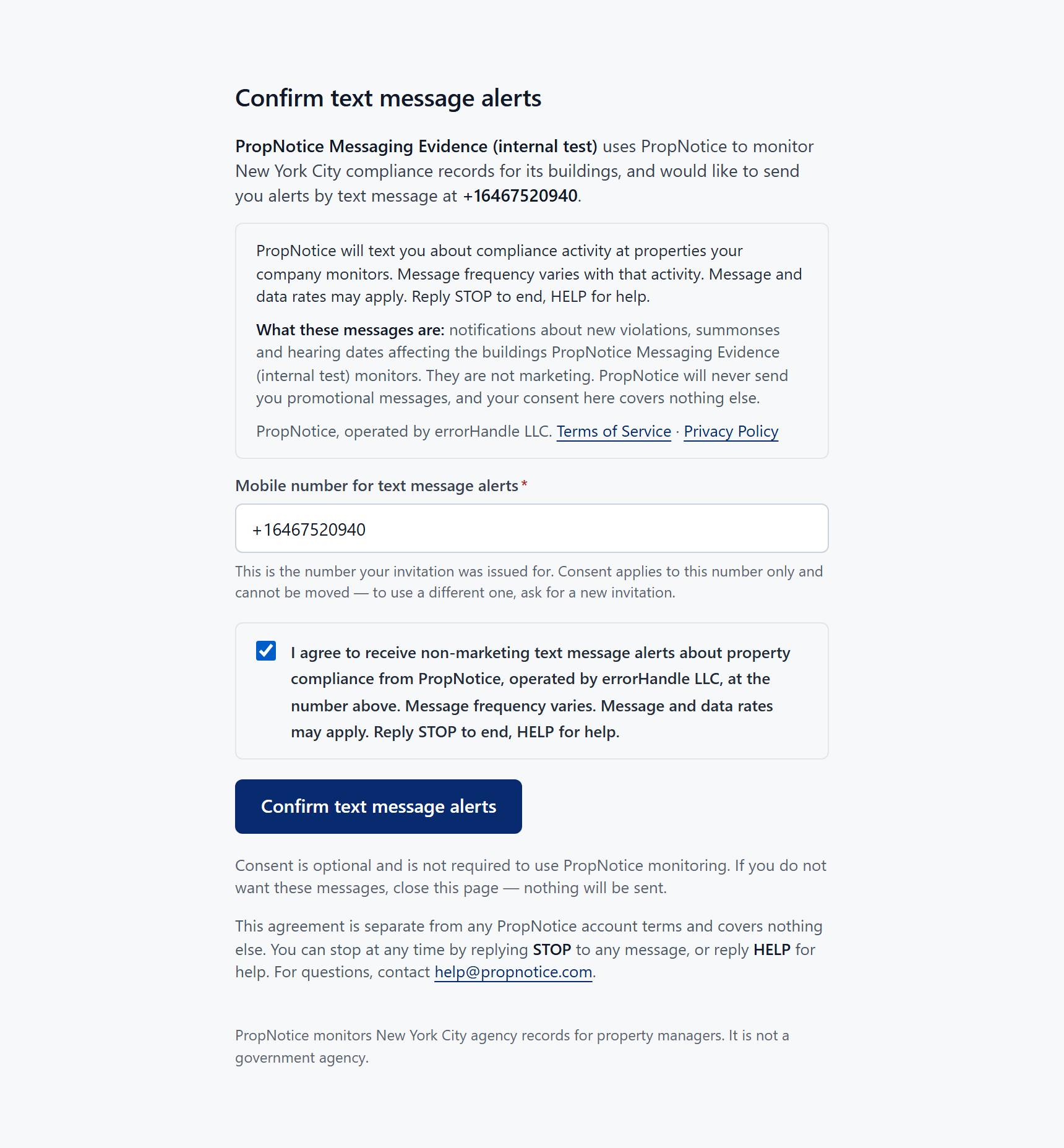
The mobile number sits in a labelled field, filled in from the invitation. The agreement checkbox ships unticked and is required both in the browser and again on the server, so an absent tick can never be mistaken for a decision.
The consent is bound server-side to the number the invitation was issued for. Editing the field does not move consent to the new number — the submission is refused and the invitation stays unused. An invitation addressed to one handset must never become a way to subscribe a different one.
4. The consent is recorded, with how to stop.
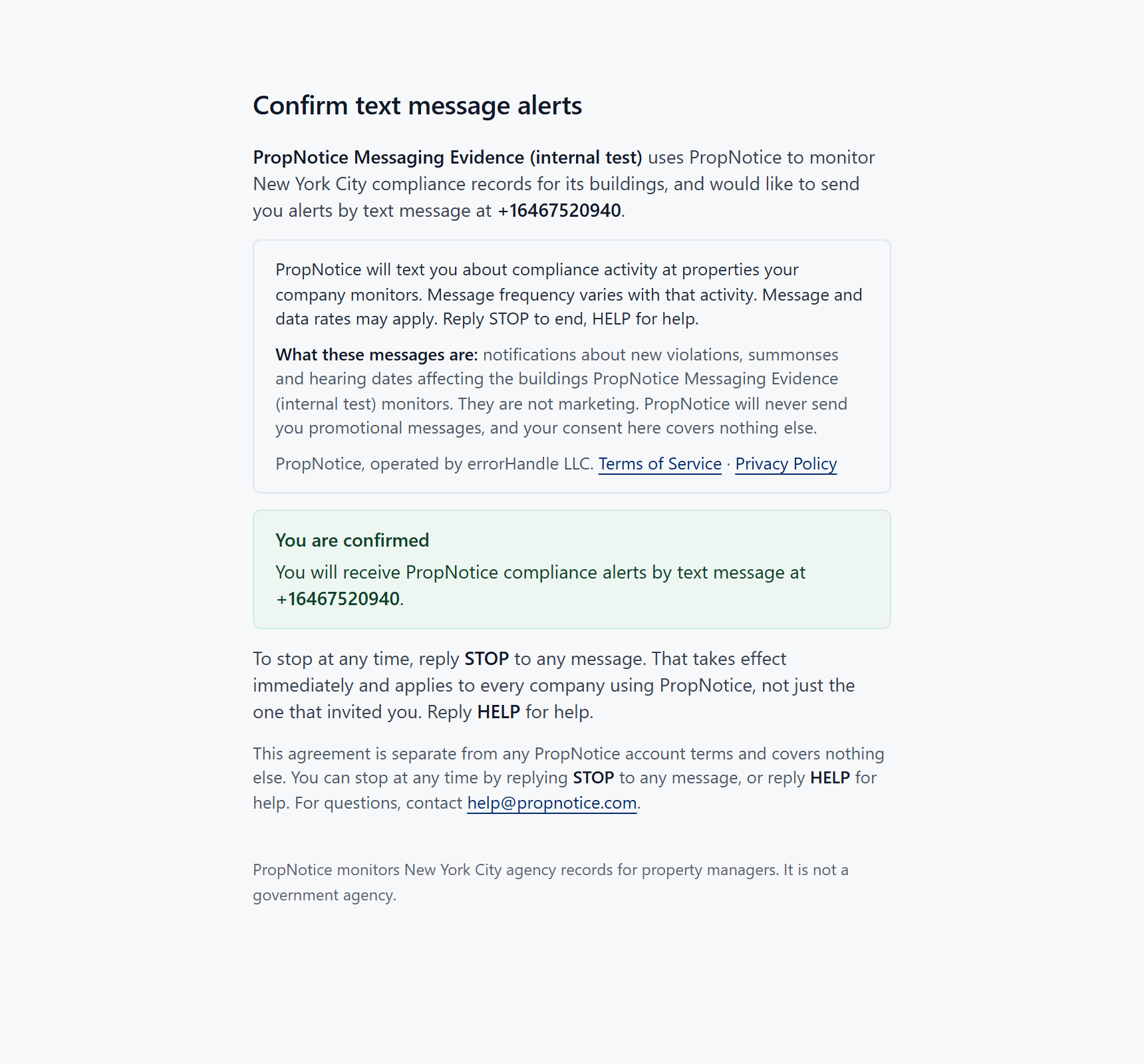
Only now does a consent record exist. It stores the organization, the recipient, the channel, the exact mobile number, the time, the method, the version of the disclosure that was on screen, and a one-way hash of the IP address and client that submitted the form.
The confirmation repeats how to leave, because that is the moment it is worth knowing: a reply of STOP ends messages immediately, needs no account and no explanation, and applies to every organization using PropNotice rather than only the one that invited you.
What the consent form shows before anything is submitted
- A labelled mobile number field, populated with the number the invitation was issued for.
- An unticked checkbox reading: “I agree to receive non-marketing text message alerts about property compliance from PropNotice, operated by errorHandle LLC, at the number above. Message frequency varies. Message and data rates may apply. Reply STOP to end, HELP for help.”
- The messaging disclosure, version 2026-10-01, recorded against the consent: “PropNotice will text you about compliance activity at properties your company monitors. Message frequency varies with that activity. Message and data rates may apply. Reply STOP to end, HELP for help.”
- What the messages are, and that they are not marketing.
- That SMS consent is optional and is not required to use PropNotice monitoring, which works the same either way.
- Clickable Privacy Policy and Terms of Service links, and the support address.
- The name of the organization asking, and the operator of the service.
Keywords, and what each one replies
These are the exact replies configured on the messaging service. Note what START does and does not do: it lifts the carrier-level block so the number may be invited again. It does not resume alerts and does not restore a consent that was revoked — that needs a fresh invitation and a fresh confirmation, which is what the Terms promise.
STOP, STOPALL, UNSUBSCRIBE, CANCEL, END, QUIT, REVOKE, OPTOUT
“You are unsubscribed from PropNotice alerts and will get no more messages from this number. Reply START to allow a new invitation. Reply HELP for help.”
START, UNSTOP
“This number is no longer blocked. PropNotice alerts do not resume until a property manager invites you again and you confirm. Reply HELP for help.”
HELP, INFO
“PropNotice sends NYC property compliance alerts for buildings your company monitors. Msg & data rates may apply. Reply STOP to end. help@propnotice.com”
What a text message looks like
Produced by the deployed message builder. Every alert ends with STOP to end, and a long property name is shortened rather than allowed to cut off the record link or the opt-out instruction. No text alert contains an apartment number, an occupant name or a violation description, because a text message is unencrypted and often previews on a locked screen.
- PropNotice: 1302 Findlay Avenue - New FDNY-issued ECB/OATH summons - https://propnotice.com/records/a7f3c1d2-4b5e-4a8c-9f10-2e6b8d4c7a91 - STOP to end
- PropNotice: 25-40 Steinway Street - OATH hearing approaching - due Nov 14, 2026 - https://propnotice.com/records/a7f3c1d2-4b5e-4a8c-9f10-2e6b8d4c7a91 - STOP to end
- PropNotice: 41-15 Main Street - Immediately hazardous or Class C record - https://propnotice.com/records/a7f3c1d2-4b5e-4a8c-9f10-2e6b8d4c7a91 - STOP to end
About the capture
The recipient in these screenshots is an internal PropNotice test line belonging to errorHandle LLC, held by a test organization marked as such in our database. It is not a customer and not a member of the public. We used a test line deliberately: requesting a new invitation supersedes any existing consent for that recipient, so photographing a real customer's opt-in would have destroyed their consent in order to document it.
The one-time token that appears in the invitation link is not shown on this page, and was redeemed by the capture itself. Everything else is exactly what a recipient sees.